


Client Communication Automation for Immigration Consultants
How to Keep Clients Informed Without Spending All Day on Emails
If you are an immigration consultant, you probably know this inbox: dozens of emails asking the same question.
“Any updates on my case?”
“Did you receive my documents?”
“What happens next?”
Client communication automation for immigration consultants is a way to fix this. It means using structured messaging systems, automated status updates, and secure client portals to keep clients informed throughout their case, without you having to write the same email over and over again.
For RCICs in Ontario and the Greater Toronto Area, this kind of immigration client communication automation can save 5 to 8 hours every week. That is time you can spend on actual case work instead of typing “your application is still processing” for the tenth time today.
What Does RCIC Communication Automation Actually Look Like?
Let me be clear about what automation means here, and what it does not mean.
Automation does NOT mean:
- Robots giving legal advice
- AI making decisions about cases
- Removing personal communication entirely
- Sending cold, impersonal messages
Automation DOES mean:
- Sending automatic updates when something happens (“We received your passport scan”)
- Giving clients a portal where they can check their status anytime
- Using templates for common messages so you are not rewriting from scratch
- Setting up reminders that go out automatically at key milestones
You stay fully responsible for professional advice and case decisions. The system just handles the routine “keeping clients informed” part.
Think of it like this: automation handles the “what is happening” questions so you can focus on the “what should we do” conversations.
How Much Time Can You Actually Save?
Immigration consultants who set up structured communication systems typically see:
60 to 70 percent fewer “any updates?” emails
When clients can check their status in a portal or receive automatic milestone updates, they do not need to email you asking.
5 to 8 hours saved per week
That is the time most consultants spend on routine status communications. With automation, this drops dramatically.
Faster response times
Instead of clients waiting 24 to 48 hours for a status update, they get instant confirmation when something happens.
Happier clients
Clients feel more informed and less anxious when they know what is happening. Clear communication builds trust, even when the news is just “still processing.”
For busy immigration practices across Ontario, these improvements add up fast.
Why Do Immigration Consultants Spend So Much Time Chasing Documents?
When immigration case preparation automation is structured properly, the benefits add up quickly:
What Types of Updates Can Be Automated?
Not everything should be automated. Here is how to think about it:
Good for automation
- “We received your document” confirmations
- “Your application was submitted to IRCC” notifications
- Biometrics appointment reminders
- General processing milestone updates
- Payment confirmations
- Document request reminders.
Keep personal
- Complex case strategy discussions
- Bad news or difficult updates
- Responses to specific client questions
- Situations requiring professional judgment
- Anything sensitive or unusual
The goal is not to automate everything. It is to automate the routine stuff so you have more time for the important stuff.
Is This Safe and Compliant for RCICs?
This is the right question to ask. For immigration consultants, compliance always comes first. A safe automated client updates immigration system includes:
Secure messaging platforms
Communications should be encrypted and protected. No sensitive information through unsecured channels.
Controlled client access
Clients should only see their own case information. Proper access controls prevent any mix-ups.
Audit trails
Every automated message should be logged. You should be able to see exactly what was sent and when.
Human oversight for sensitive updates
Important or complex updates should still come from you directly. Automation handles routine; you handle judgment.
PIPEDA compliance
Client data must be handled according to Canadian privacy law. Secure storage, controlled access, and proper consent.
This approach works within CICC professional standards. You are still the consultant. The system just helps you communicate more efficiently.

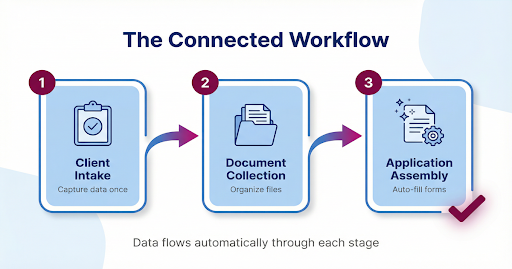
How Does Application Assembly Fit the Full Workflow?
Application assembly automation works best when connected to earlier stages of your workflow:
Step 1: Client Intake Automation Structured forms capture complete, verified client information from the start.
Step 2: Document Collection Automation Supporting files arrive organized, correctly named, and easy to reference.
Step 3: Application Assembly Automation Verified data flows into IRCC forms. Documents attach in the right order. The consultant reviews and approves.
When these pieces connect, workflows become predictable instead of reactive. You stop chasing information and start moving cases forward.
This connected approach is part of Barrana’s AI Automation for Immigration Consultants framework.
Common Mistakes Immigration Firms Make with Communication
Some firms try to improve communication but make things worse by:
Relying only on email threads Emails get buried. Clients cannot find previous updates. They email again asking the same question.
Sending inconsistent updates Some clients get detailed updates, others get nothing. Inconsistency creates confusion and complaints.
Being reactive instead of proactive Waiting for clients to ask instead of updating them automatically. This creates more work, not less.
Using generic tools General communication platforms do not understand immigration workflows. They cannot send updates based on case milestones.
The fix is not sending more emails. It is building an immigration case communication system that keeps clients informed automatically.
A Simple Way to Start
You do not need to overhaul everything at once. Start small:
- Create standard update templates Write templates for your most common updates. “Document received.” “Application submitted.” “Biometrics reminder.” This alone saves time.
- Set up milestone notifications Pick 3 to 5 key moments in a case where clients always want updates. Automate those first.
- Consider a client portal A simple portal where clients can log in and see their status reduces emails dramatically.
- Set clear response expectations Tell clients upfront how and when they will hear from you. Clarity reduces anxiety-driven emails.
Even small improvements can cut your communication workload significantly.
If your firm is spending too much time cleaning intake data instead of reviewing cases, we can map one intake workflow and show what safe automation could look like for your practice.
Common Concerns from Legal ProfessionalsFAQs
Client communication automation is the use of structured messaging systems, automated status updates, and secure client portals to keep clients informed throughout their immigration case. It handles routine updates automatically so consultants can focus on professional advice and case strategy.
Yes, when designed correctly. Safe systems include secure messaging, controlled client access, audit trails for all communications, and human oversight for sensitive updates. Automation should align with CICC professional standards and PIPEDA privacy requirements.
Immigration consultants typically save 5 to 8 hours per week on routine status updates and client inquiries. Automated updates can reduce “any updates?” emails by 60 to 70 percent.
Yes. Automation handles routine status updates and common questions. Clients can still contact you directly for personal advice, complex questions, or urgent matters. Automation supports your communication — it does not replace the relationship.
Common automated updates include document received confirmations, application submission notifications, IRCC processing milestones, biometrics appointment reminders, and general case status updates. Sensitive or complex updates should still come directly from the consultant.
Ready to Reduce Your Application Assembly Time?
If your firm spends hours re-entering the same client information across IRCC forms, there is a better way.
We can map your application assembly workflow and show exactly where automation saves time, without adding compliance risk.
What you get:
- Analysis of your current application process
- Identification of repetitive data entry points
- Custom recommendations for your practice areas
- Clear roadmap for implementation
Barrana.ai builds AI automation for immigration consultants in Ontario and the Greater Toronto Area. We help RCICs reduce admin work while staying compliant with CICC and PIPEDA requirements.